Modify certain programs in this free utility
ForceToolkit is a small but powerful utility application developed by AutoClose. In this free app, you can access a few functions that forcefully modify the state of other program controls. It allows you to enable grayed-out buttons and checkboxes, hide windows, and let them run in the background.
ForceToolkit also enables you to make windows always on top, change titles, and forcefully kill the process and close programs. The app is available on various Windows OS iterations, including Windows 10, 7, 8, and Windows XP. However, it should be noted that some functions are limited on some Windows OS.
How do you use ForceToolkit?
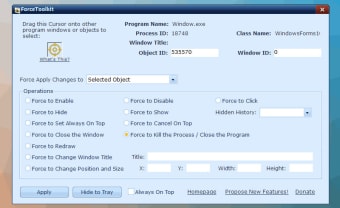
ForceToolkit is a handy application that gives its users some additional controls over their Windows programs. It allows you to operate on them more thoroughly, including forcefully hiding them or changing their window title. The app is quick to install, and making use of its functions comes naturally. However, for it to work, you will have to drag the cursor from the interface onto the windows you want to adjust.
As mentioned, you can use the app to activate buttons and make checkboxes enabled. You can drag the cursor to the windows with grayed-out checkboxes or buttons. Then, select the Force to Enable option in the Operations frame and hit the Apply button. You will see the disabled buttons and checkboxes are changed. Of course, you can also use this action to disable enabled objects.
The program also works on third-party applications without fail. You can change the window title or set it up so that it is always on top. Additionally, you can forcefully disable, enable, or hide the targeted window. Aside from these, you can also force a preferred window size as it allows you to change the width and height values. Users can also redraw the object's UI area.
Is the app good?
Overall, ForceToolkit is a handy tool that lets you get more customization on your windows programs. It enables you to make some changes, affording you with more possibilities to enhance the practicality depending on your use. It even works on third-party applications. However, its functionality is limited on some Windows OS. Some features might work on one app but will not on another.